Keep Your Organization's .pptx Template
Upload your existing company or university .pptx template. MondayFile preserves your master layouts, brand palette, and logos while filling in your new content cleanly.
Native .pptx Export · Built for Everyday Office Work
Describe what you need or upload a Word doc, PDF report, or your own .pptx template. MondayFile builds clean, structured slides you can click to refine in your browser and export as a genuinely editable PowerPoint file.
File uploads and prompt generation are governed by our Privacy Policy, Terms of Service, and Acceptable Use Policy (unlawful & NSFW generation prohibited).
Select any text block or drag a box on a slide to request layout changes, tighter wording, or charts.
Built for Real Office Workflows
Upload your existing company or university .pptx template. MondayFile preserves your master layouts, brand palette, and logos while filling in your new content cleanly.
Upload .docx, text-based .pdf, .xlsx, .csv, .txt, or .md reference materials along with images. Embedded figures are extracted automatically, and missing numbers are flagged as [TBD] instead of invented.
Need Slide 4 switched to a comparison table, or tighter executive wording? Click or box the exact area in your browser to revise individual slides without regenerating the whole deck.
Real Slide Outputs
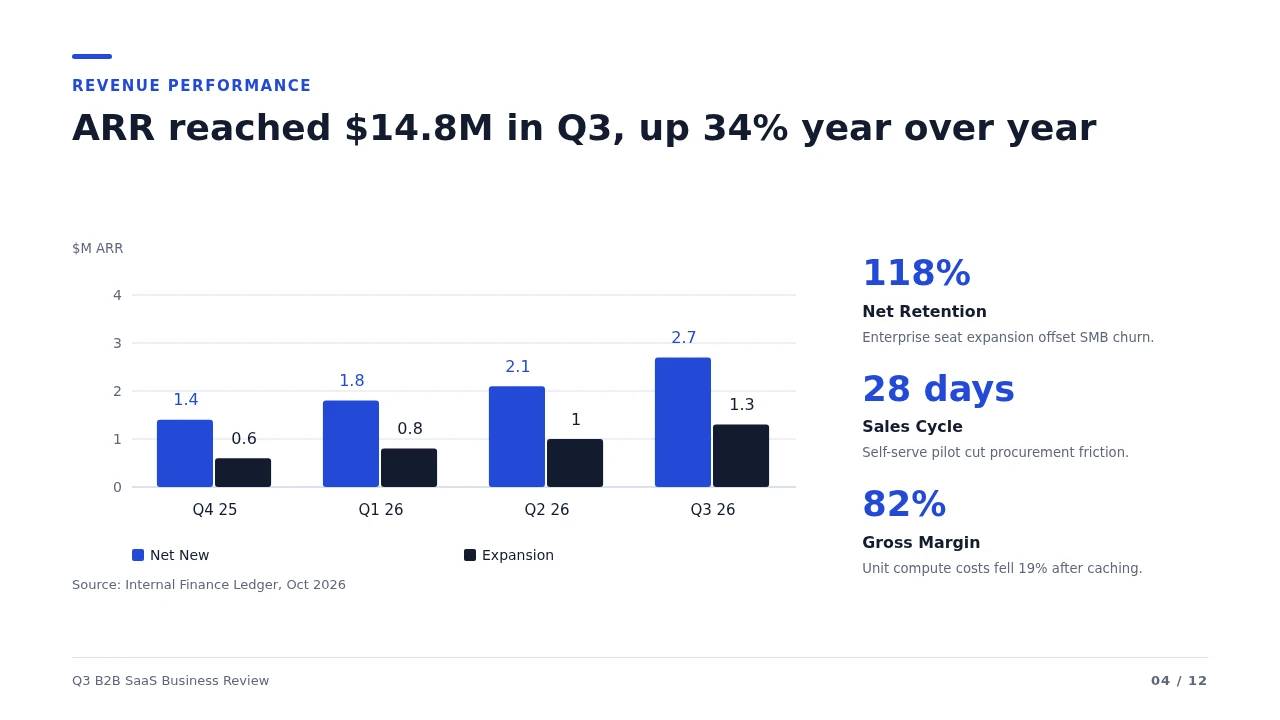
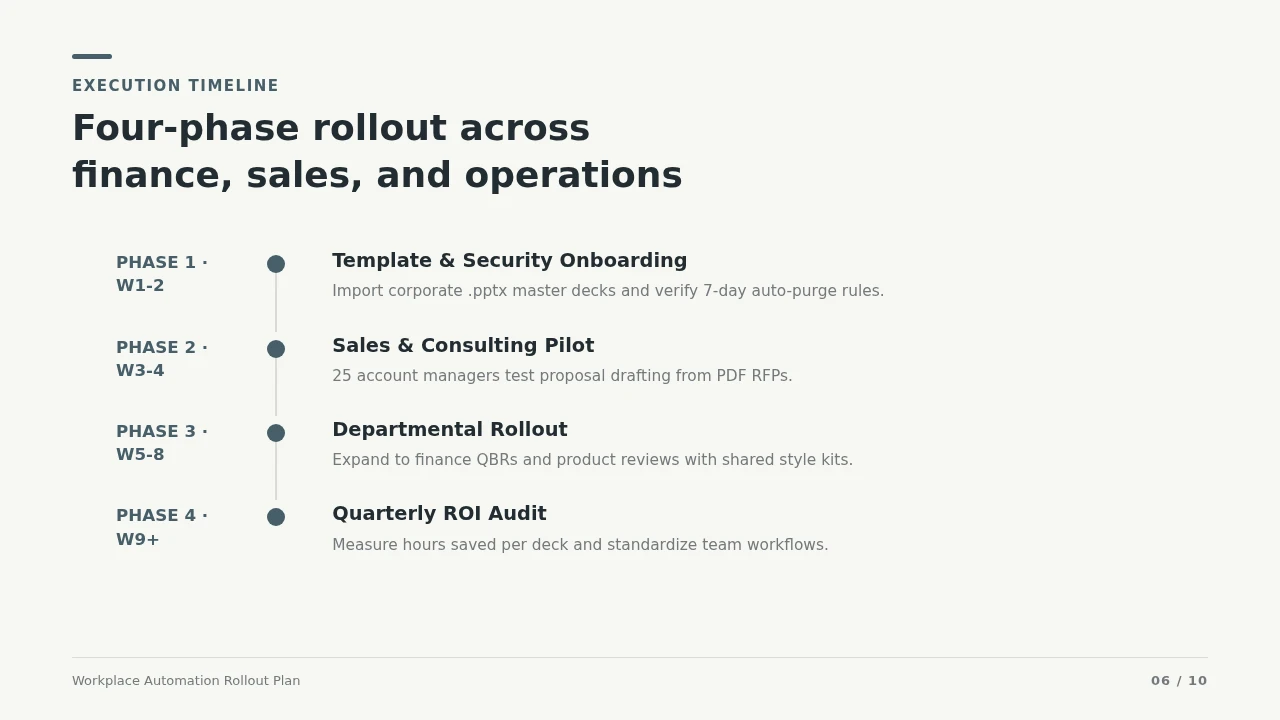
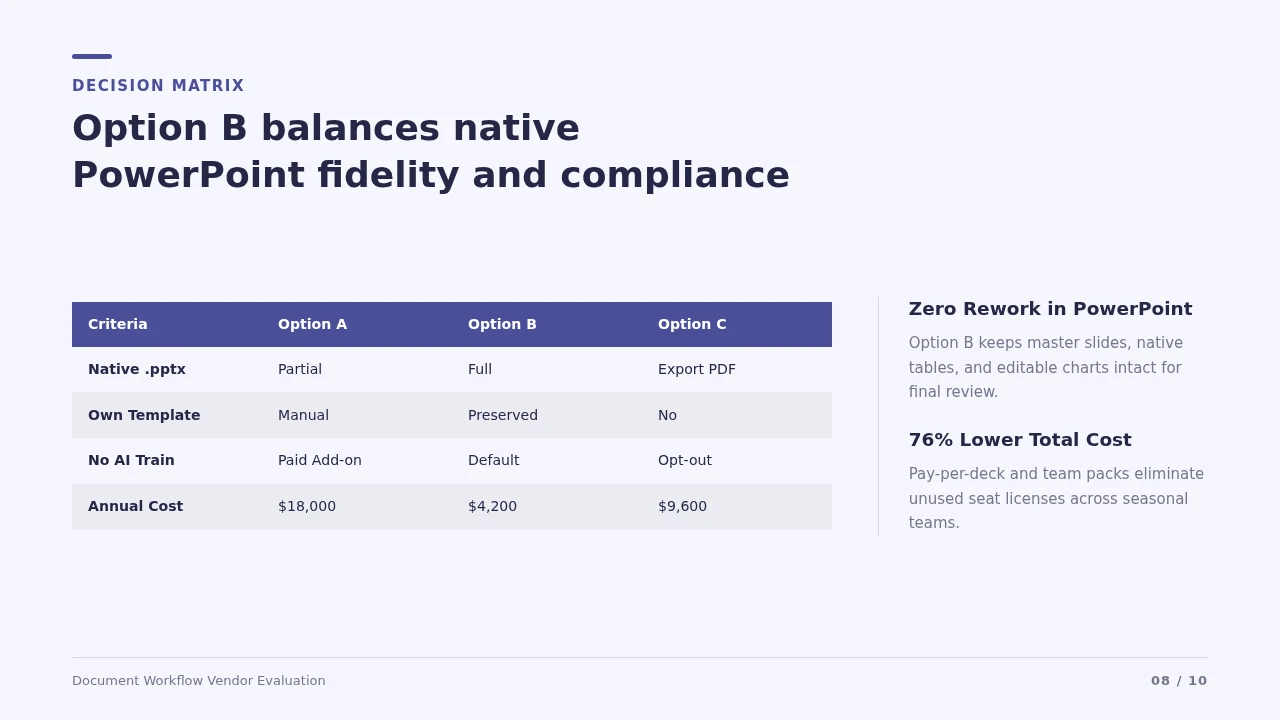
Every preview below was rendered directly by MondayFile's layout engine. Every element exports as native PowerPoint objects you can edit freely.
How It Works
Write a sentence or paste an outline. Optionally upload Word, PDF, Excel, images, or your own .pptx template.
MondayFile asks a handful of quick multiple-choice clarifications on audience, scope, or slide count — skip any you like.
Review every slide in your browser, click anywhere to polish specific sections, and download a clean editable .pptx file.
Simple, Transparent Pricing
Preview your first deck for free before paying. Unlock your deck with a one-time Single Deck purchase or save with a 5-Deck Pack — no recurring charges.
1 trial deck preview
Experience template fitting and click-to-edit slides before buying.
One-time purchase · no subscription
Ideal for a single client proposal, QBR, or presentation.
5 decks ($3.80 / deck) · valid 12 months
Built for regular meetings and proposals without recurring bills.
How to buy & access: Select a plan above to verify your email and complete a one-time USD checkout securely through Creem (our Merchant of Record for payments, VAT/JCT/sales tax, and receipts). Workspace access or deck credits activate immediately after checkout. Zero subscriptions · Uploaded files are never used for AI training and are deleted after 7 days · Unlawful and NSFW generation is strictly prohibited. Review our Terms of Service, Privacy Policy, Acceptable Use Policy, and Refund Policy.
FAQ
Yes. All titles, bullet lists, tables, native data charts, and diagram shapes export as editable PowerPoint objects — not screenshots or flattened images. They open cleanly in Microsoft PowerPoint (Windows/macOS), Google Slides, and Apple Keynote. MondayFile is an independent tool and is not affiliated with Microsoft.
Yes. Upload any standard .pptx template and MondayFile preserves your slide master, brand colors, logos, and native layout slots while populating your new deck. If you don't have a template, MondayFile automatically selects from 130+ clean office, consulting, academic, and minimal styles.
Templates: .pptx. Reference & data materials: Word (.docx), text-based PDF (.pdf), Excel (.xlsx), CSV/TSV (UTF-8 & Shift_JIS), Markdown (.md), plain text (.txt), OpenDocument (.odt/.ods), RTF, and HTML exports. Images: PNG, JPEG, and WebP. Figures embedded inside Word and PDF documents are also automatically extracted for use in slides.
Never. Your uploaded documents, templates, prompts, and generated decks are never used to train AI models. All uploaded files and generated deliverables are automatically and permanently deleted 7 days after your latest delivery, or earlier on request via support@mondayfile.com.
All paid plans are one-time USD purchases (no recurring subscriptions) processed by Creem as Merchant of Record, handling regional sales tax, EU VAT, Japanese JCT, and receipts. If a technical failure prevents delivery of a usable editable .pptx file, or if a 5-Deck Pack is unused, we provide a full refund within 14 days.
Spend your time on the message — let MondayFile handle structure, layout, and native PowerPoint export.
We will send a 6-digit verification code and one-click sign-in link to your inbox — no password needed.
Enter the 6-digit code we emailed you, or click the sign-in button inside the email.
Preparing your workspace…
Need help? Email support@mondayfile.com